Tibia 15.23 or newer / New: now on OTClient (OTC) / 2027: support for RubinOT and CipSoft

Tibia Bot for Global, RubinOT and OTServers.

DrenoxBot is a bot for Tibia, a Tibia Bot with CaveBot, healing and targeting, plus the wiki inside the client. Wiki, Hunt Finder, Set Finder and market prices in a window inside the client, without opening the browser. And the bot sets itself up with what you find.

License for 1 PC / Updates included / Support on the forum


Wiki in the client: the Witch creature with the mini map, then the Hunt Finder for the quest, the boss Ekatrix and the Witch Hat item
Wiki in the clientcreature · map · quest · boss · item
Wiki

The whole Tibia wiki, inside the client.

The Wiki button opens any page on top of the game, with the client's own sprites. In Portuguese it uses TibiaWiki BR; in English, the Fandom wiki.

  • Monsters: HP, experience, resistances and loot with drop chance
  • Items: attributes, who buys, who sells and which monster drops it
  • NPCs and quests: location, prices, requirements and rewards
  • Mini map with the location and you, zoom and floor change
  • Links between pages, with a back button
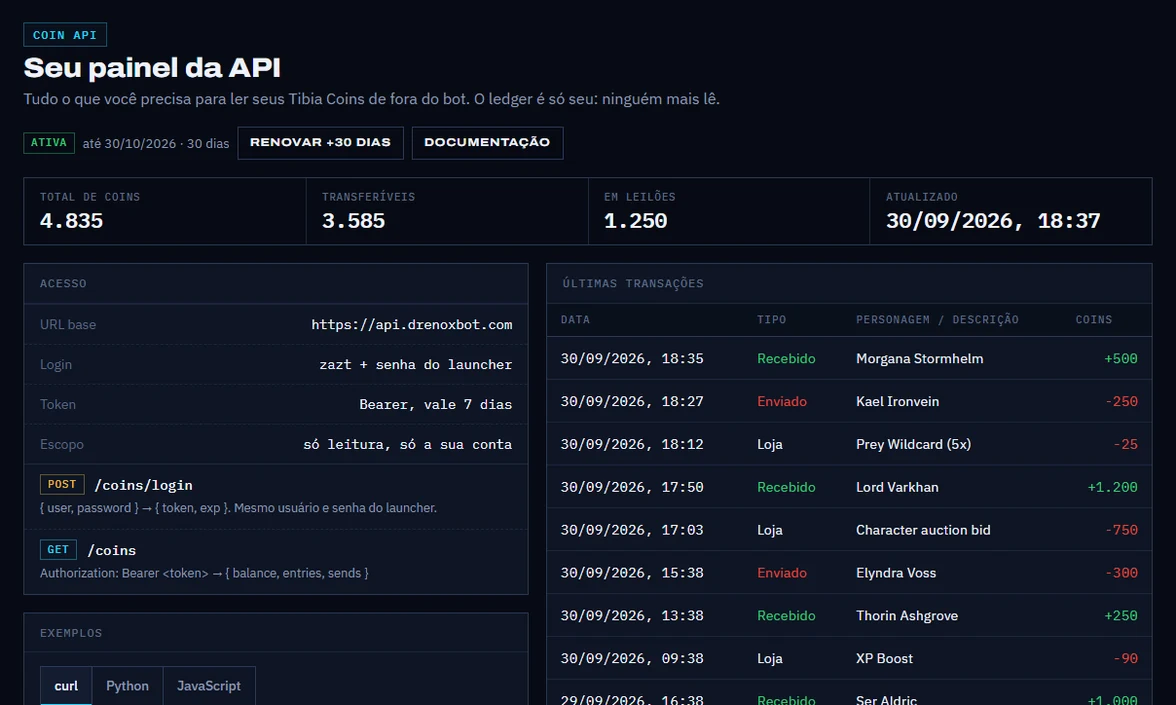
Coin API dashboard: total, transferable and auction balance, API access and the latest transactions with the character on each transfer
Coin API dashboardbalance · history · transfers
Coin API · New

A Tibia Coins bank, via API.

Paid add-on for Pro and Pro Max plans: read your account's coin balance and history from outside the bot, through a simple HTTP API. Build a Tibia Coins bank — who sent, who received, how much there is — with control over what comes in and out.

  • Total, transferable and auction balance
  • Who sent and who received, transaction by transaction
  • Coin API tab inside the bot and API dashboard in your Panel
  • Everything you need to integrate is in the documentation
  • R$ 16.50/month on top of an active Pro or Pro Max plan, per account

Hunt Finder showing a hunt with xp/h, loot/h, creatures, recommended set and drops
Hunt Finder tab131 hunts
Hunt Finder

Find where to hunt at your level.

Filter 131 hunts by level and vocation and compare xp/h and loot/h. Each hunt shows creatures, recommended set, supplies, valuable drops and imbuements.

  • Points you to a better hunt when there is one
  • One button sets up targeting, shooter, healing and equipment for the hunt
  • Opens the set in Set Finder and the hunt in the Wiki

Set Finder switching between two knight sets
Set Finder tabby vocation and level
Set Finder

The right set for your level.

Ready-made sets by vocation, level range and element, taken from the wiki guides. Swap any slot while seeing every item in the game for it.

  • General, fire, ice, energy, earth, death and holy
  • Stats, where to get it and market offers for each item
  • Sends the set to the Equipment tab with one button

Market Finder with the item list and sell, buy, spread and NPC columns
Market Finder tabsell · buy · spread · npc
Market Finder

Market prices without opening the market.

Buy, sell, spread and NPC price for each item in one table. Filter by what is in your depot and see what is worth selling.

  • Search by name and filter by profit
  • Compares with what the NPC pays
  • Shows only what is in your depot

Items and Char tab going through Item DP, Item Char and Char
Items & Char tabdepot · stash · inbox
Items & Char

Your depot in one search.

Depot, stash, inbox and what you carry in one list. Standing on the depot, take the item straight to your backpack, without opening box after box.

  • Takes from the stash, the depot boxes and the inbox
  • Sends what is in your bag to the stash with one button
  • Skills, blessings, prey, balances and character history
Panel

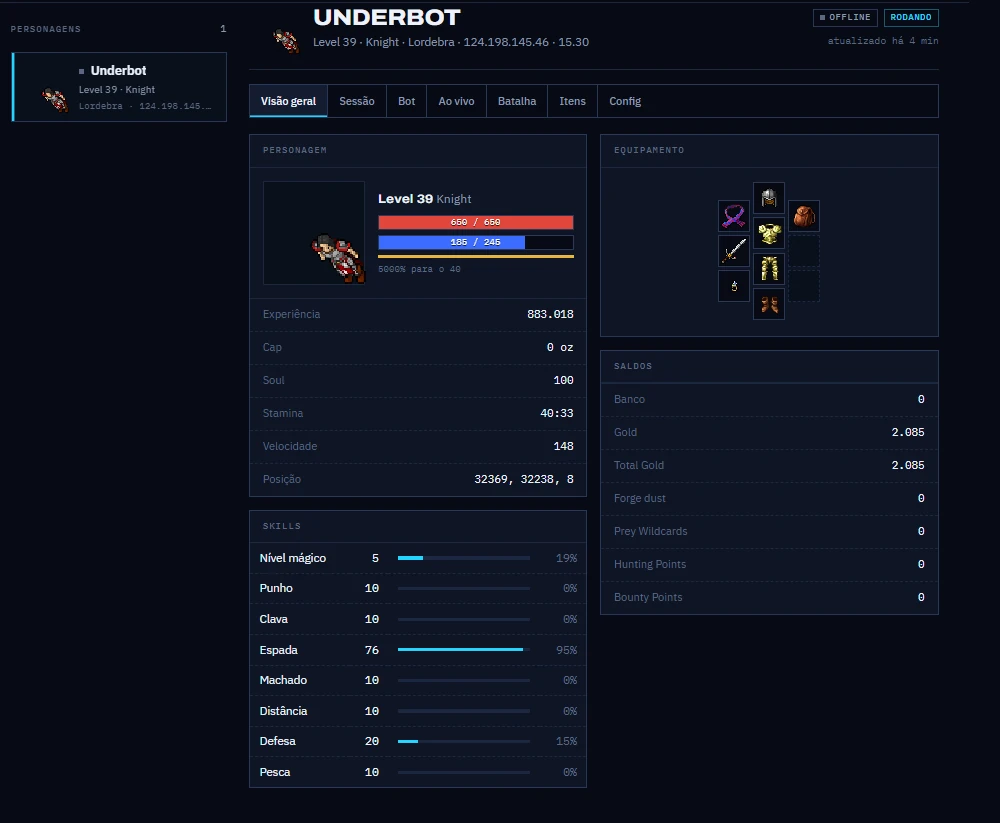
Your character on your phone while the bot hunts.

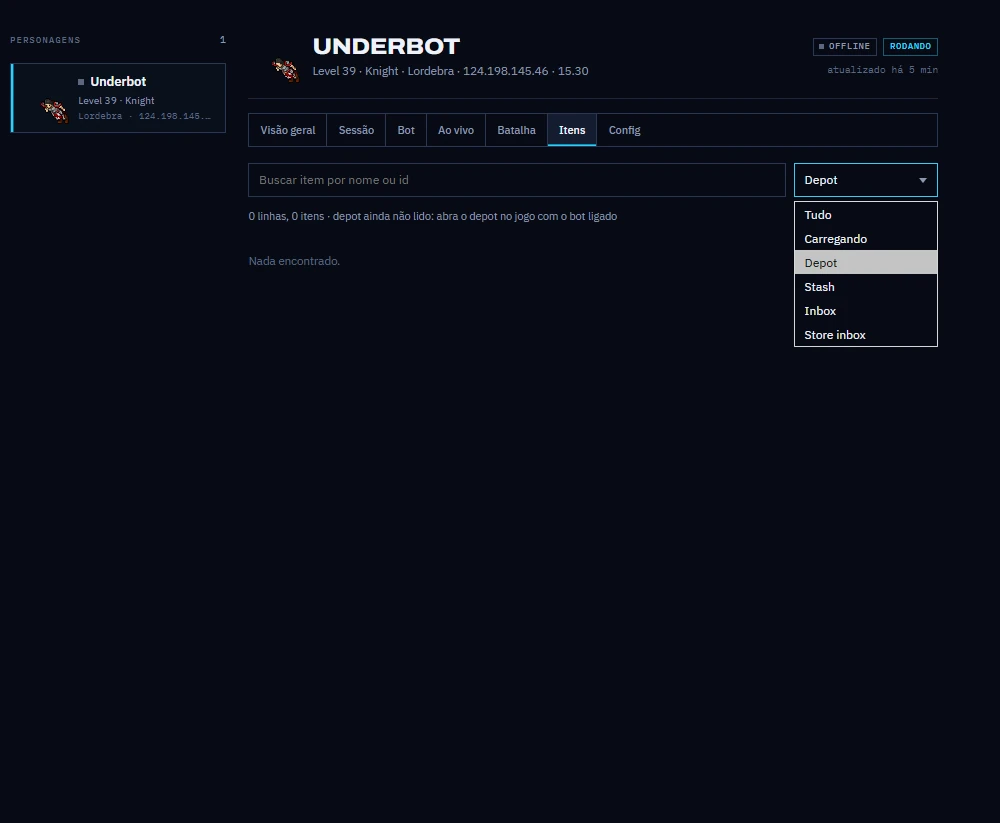
While you play, the bot sends the character's state to the site, every 5 seconds while the panel is open. See every character on the account and control the bot from another PC or your phone.

  • Health, mana, skills, equipment and balances with your server's sprites
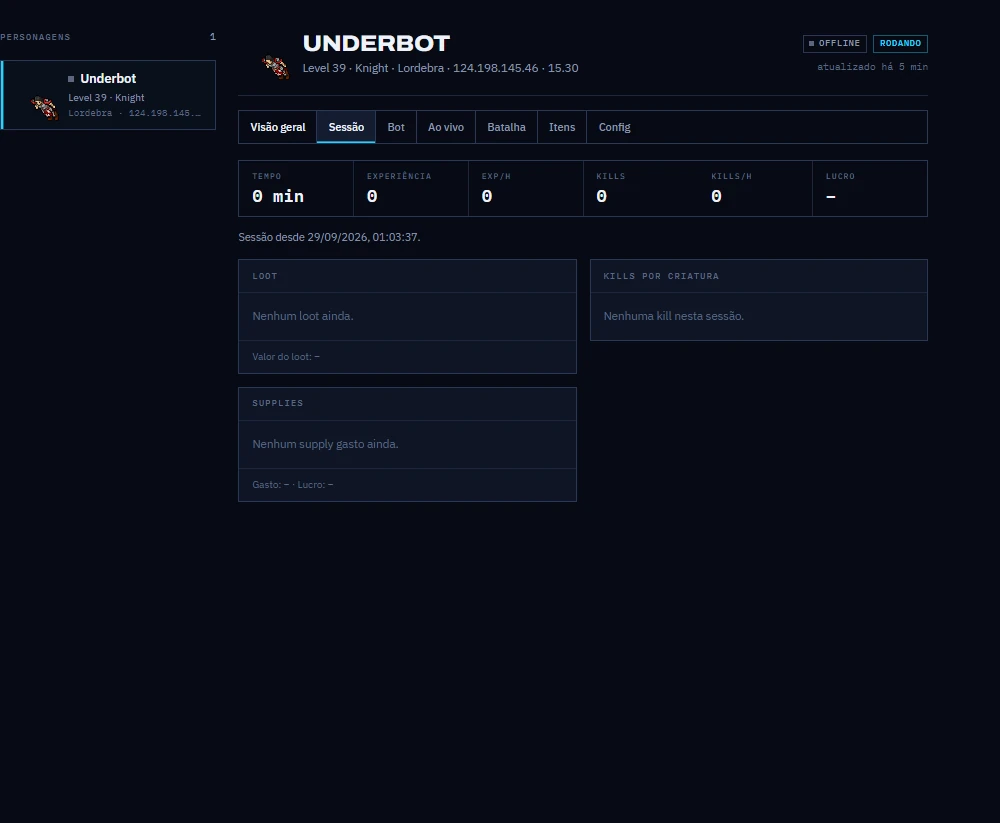
  • Session: xp/h, kills per creature and the bot log
  • Depot, stash, inbox and what you carry in one search
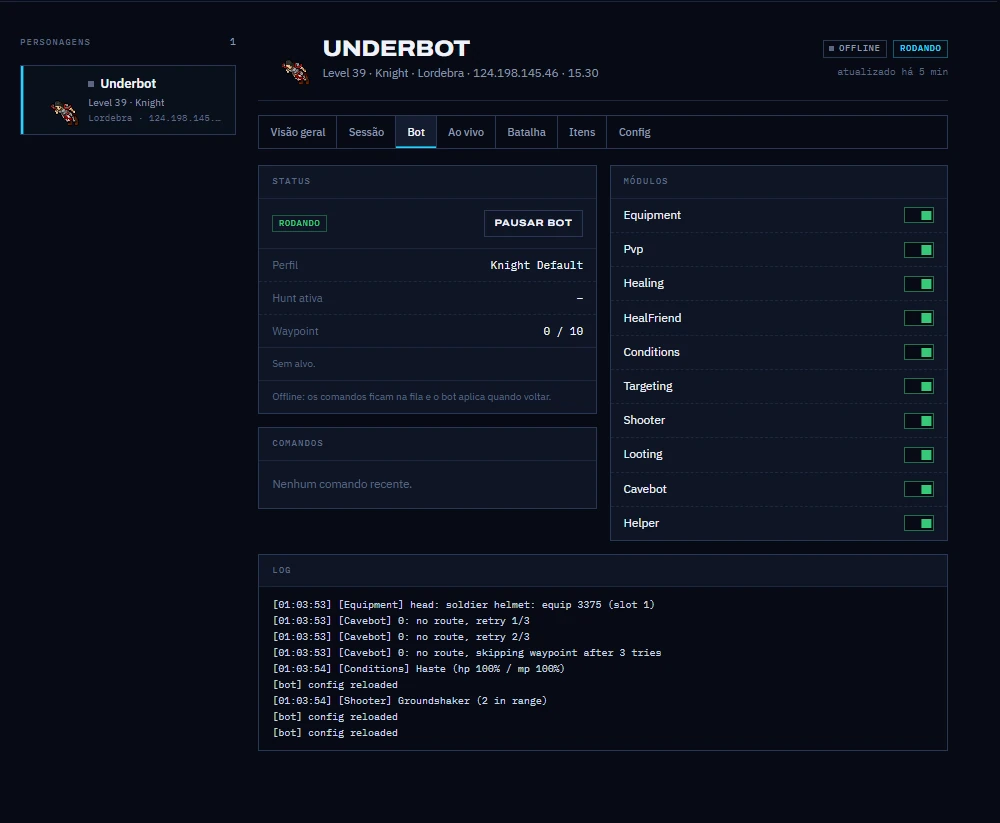
  • Pause the bot, turn modules on and off and change the config remotely
  • Live: see the screen around your character and tell it where to walk
Open the panel
Panel, Overview tab: Underbot, level 39 knight, with health and mana, skills, equipment with the server's sprites and balances
Panel on the siteUnderbot · knight 39 · Lordebra
131hunts in the Hunt Finder, with xp/h and loot/h
18config tabs inside the client
15.23+client version detected at setup
LuaIts own API, with events, timers and HUD
Features

Each tab does one thing, and does it right.

Everything shown here was captured from the bot running. The name at the top of each block is the tab where you find the feature.

Healing · Conditions · Heal Friend

Healing by priority, top to bottom.

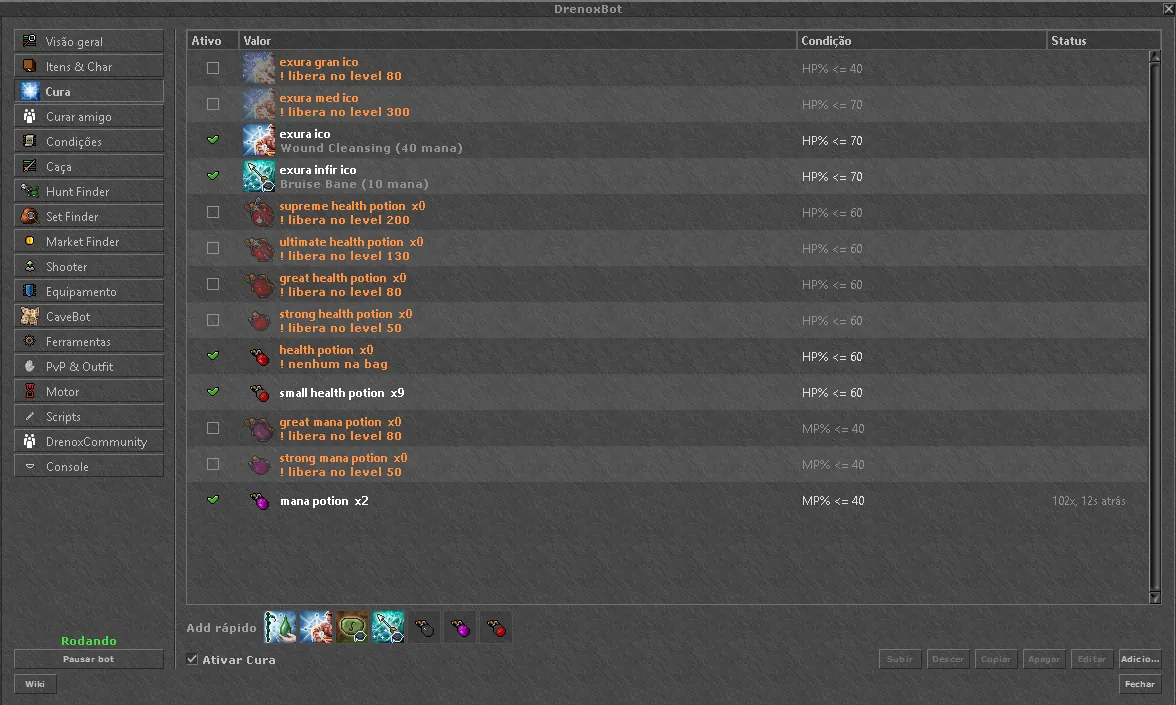
Each rule is a spell or potion with an HP or mana condition. The first rule that matches fires, and the spell's real cooldown is respected.

  • Quick add with the icons of your vocation's spells
  • Health and mana potions with separate thresholds
  • Conditions: buffs, poison and bleeding cures, food when you are hungry
  • Heal Friend: exura sio on your friend by their HP%, or on the party
Healing tab with exura ico, exura infir ico and potion rules, each with an HP or mana condition
Healing tab13 rules
Hunting · Shooter

Picks the target and attacks with it.

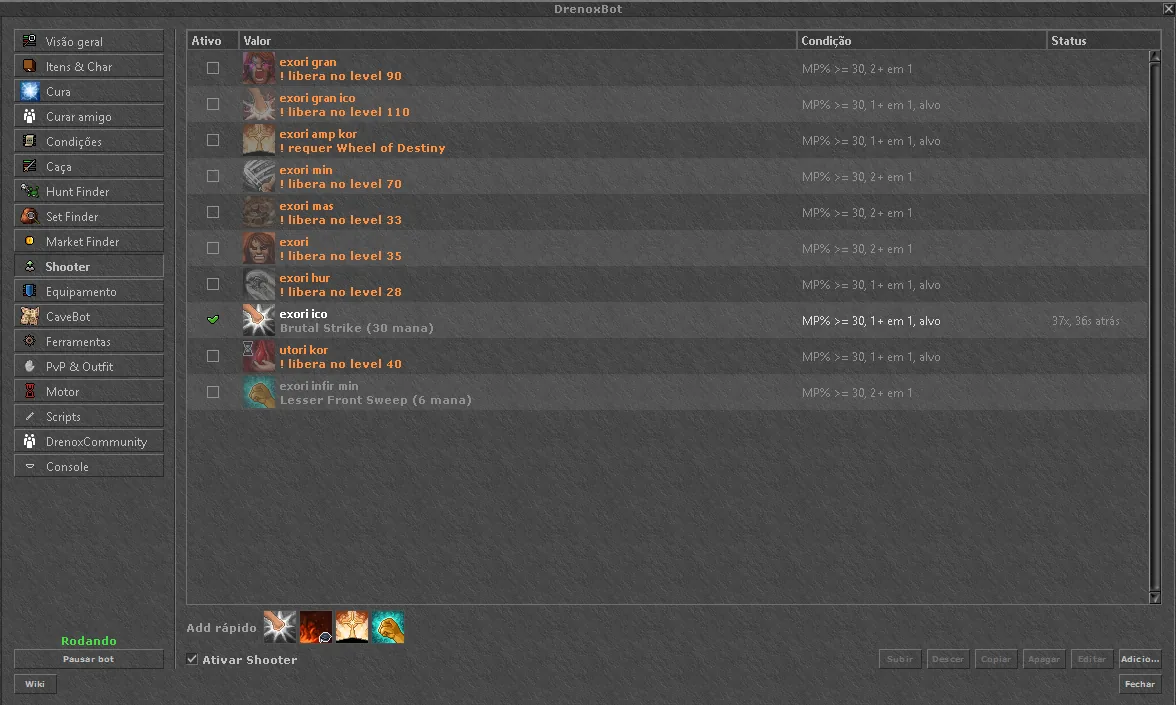
You list the monsters with a priority and a way to fight. The Shooter casts spells and runes when the conditions match, always on the attacked creature.

  • Priority per monster, melee or chase
  • Holds the target and skips what it cannot reach
  • Area spells only with enough monsters on screen
  • Conditions by mana, creature count and target
Shooter tab with attack spells and conditions by mana and monster count
Shooter tab10 rules
CaveBot

Ready-made routes, or ones you record.


The library keeps your hunts in folders. Load one with two clicks, record by walking with Auto rec, or draw the route on the map. ZeroBot .cb routes work too. See everything about the Tibia CaveBot or the RubinOT cavebot.

  • 100% AFK hunts with refill and selling
  • Waypoints in a table or on the map
  • Imports ZeroBot .cb files, without touching the original
  • Lure, node distance and special areas in the Tools tab
CaveBot tab with the hunt library on the left and the waypoint table in the center
CaveBot tab10 wp · 72 hunts in the library
Tab guide

Every tab, one by one.

The bot window has a sidebar just like this one. Pick a tab to see what it does, with a capture of the bot running.

Overview

Your character and session on one screen.


The first tab shows your character and what the bot is doing. From here you turn each module on or off with one click.

Overview tab with character, session, battle list and modules
Overview tab
  • Character: outfit, level, vocation, HP and mana, level progress, cap, soul, stamina and speed
  • Equipment: the 10 slots, with the item name on hover
  • Session: experience and kills per hour, time, position and how many rules are on
  • Battle list: HP and distance of each creature. Double-click attacks, and a button sends it to targeting
  • Modules: 9 switches: Healing, Heal Friend, Conditions, Targeting, Shooter, Equipment, Looting, CaveBot and Scripting
  • Status and Recent: current target, cavebot waypoint and the last 16 lines of the log
Items & Char

Depot, bag and character without opening box after box.

Three sub-tabs: Item DP, Item Char and Char. The data comes from the server's own Cyclopedia pages.

Items and Char tab going through Item DP, Item Char and Char
Items & Char tab
  • Item DP: search everything at once or by place: depot, stash, inbox, store inbox and what you carry
  • Withdraw: standing on the depot, takes the chosen amount from the stash, the depot boxes and the inbox
  • Store: sends what is in your bag to the stash with one button
  • Item Char: drag an item from your bag onto the Depot or Stash target, with the amount
  • Char: skills with a progress bar, XP bonus, blessings, prey and balances (bank, gold, forge dust, points and coins)
  • History: combat stats, recent deaths and achievement points
Healing

Healing by priority, top to bottom.

Each rule is a spell, potion or rune with a condition. The first rule that matches fires. Cooldown 0 uses the spell's real cooldown.

Healing tab with spell and potion rules
Healing tab
  • Quick add: up to 10 ready-made rules, with the spells you know and the potions you carry
  • Condition: up to 2 HP% or mana% clauses, joined by AND or OR
  • States: paralyzed, drunk, rooted, feared, poisoned, burning, bleeding and hungry
  • More options: custom cooldown, "without the state" (23 states, such as haste and manashield), outside PZ and only in combat
  • Supplies: the table shows how many potions are left and warns you when something runs out
  • Order: move rules up or down, copy them or disable them without deleting
Heal Friend

Heals your friend by their HP.

It is the same editor as Healing, but the HP% is your friend's. {name} in the spell words becomes their name: exura sio "{name}".

  • Players: a comma-separated list, * for anyone, or empty for the party
  • Priority: rules from top to bottom, as in Healing
Conditions

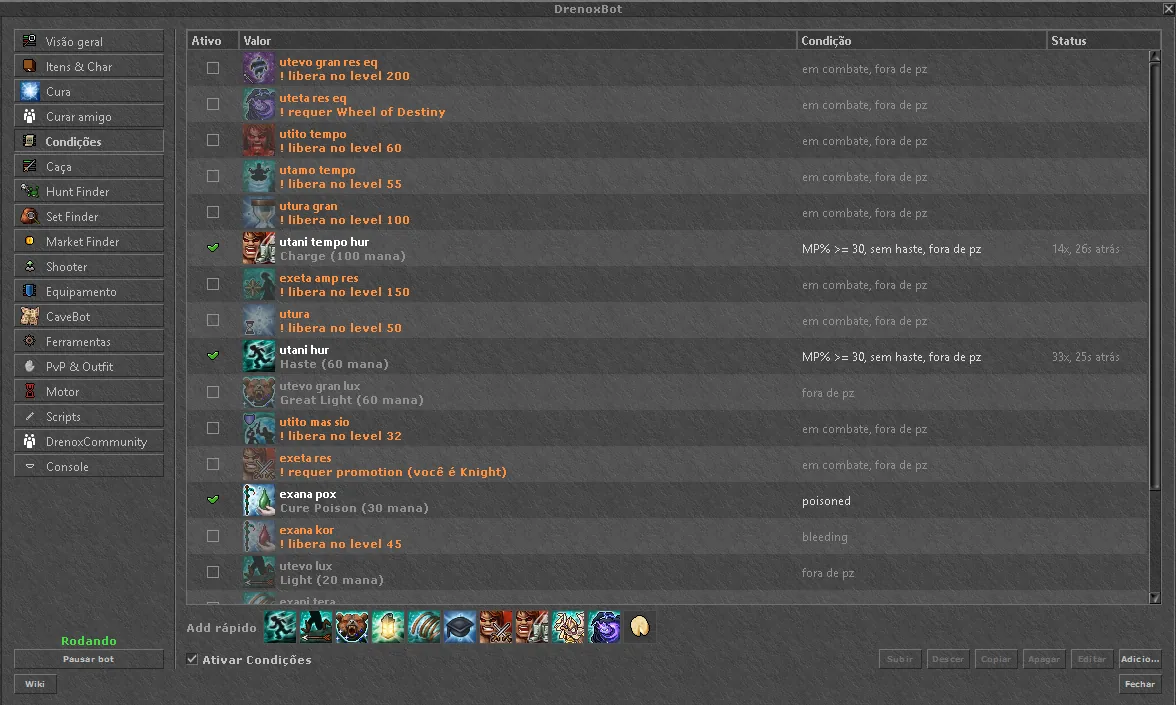
Buffs, state cures and timers.

A rule without a condition repeats on every cooldown, like utana vid. A rule with a state cures poison, fire or bleeding as soon as it shows up.

Conditions tab with buffs and state cures
Conditions tab
  • Buffs: haste, utamo vita and others, cast only when the state is missing
  • Cures: poison, burning, bleeding and paralysis
  • Food: eats when your character gets hungry
  • Filters: outside PZ and only in combat, per rule
Equipment

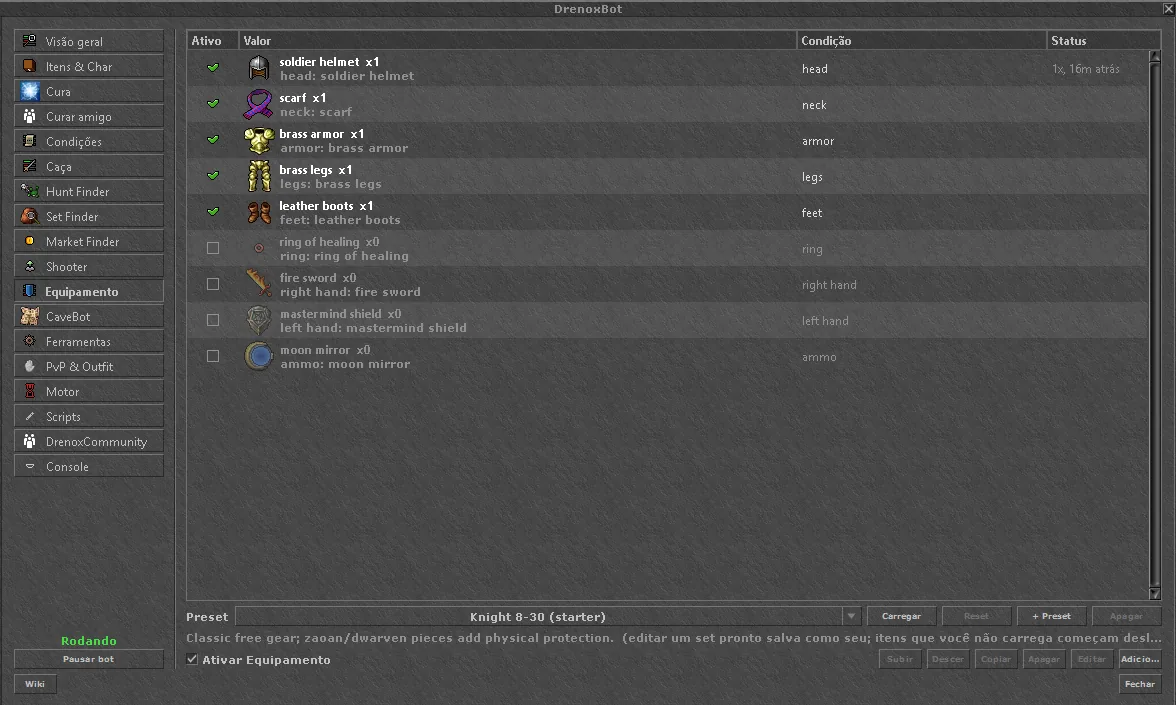
Equipment swaps by condition.

Equips an item when the condition matches and, if you want, takes it off when it ends. With no condition, it keeps the item on at all times.

Equipment tab with rules per slot and the loaded preset
Equipment tab
  • Presets: 135 ready-made sets by vocation and level, loaded with one click
  • Your presets: save your own, and it shows up marked with ★
  • Per slot: pick the slot and the item. The bot uses the client's own equip action
Hunting

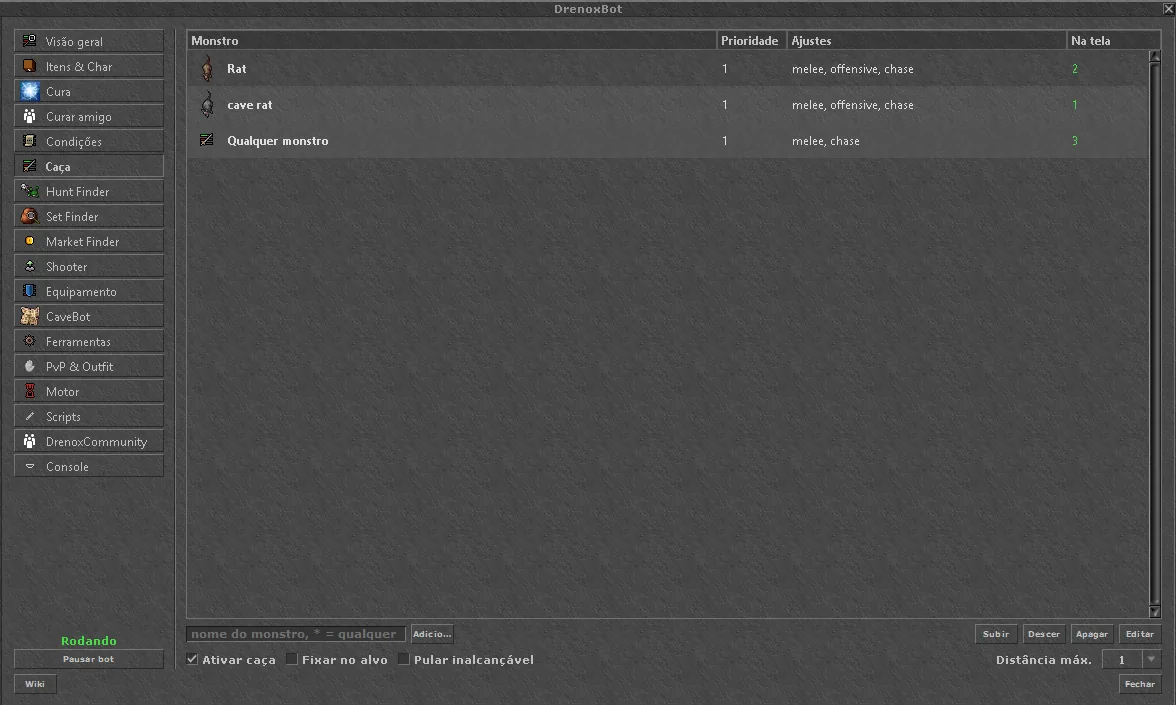
Who to attack, and how.

List the monsters with a priority from 1 to 9. * matches any monster. The "On screen" column shows how many are visible right now.

Hunting tab with the monster list and priorities
Hunting tab
  • Distance: melee, automatic or up to 7 sqm, per monster
  • Chase or stand, and fight mode on clients that still have that option
  • HP range: attacks only when the monster's HP% is in the range
  • Crowd: skips the monster when there are more creatures around than the limit
  • Stick to target and skip unreachable, with a max distance from 1 to 10
Shooter

Attack spells and runes, at the right time.

Runes and rules marked "needs target" fire at the attacked monster. Area spells wait until there are enough monsters.

Shooter tab with attack spells
Shooter tab
  • Minimum monsters and a range of 1 to 8 sqm
  • Target HP: for example, the strongest spell only above 50%
  • Creature filter: the rule applies only to the listed monsters
  • Your mana: combine with mana% so you do not spend it all
CaveBot

Route in a table, on the map, or the full cycle.

Three sub-tabs: Table, Map and 100% AFK, with the hunt library beside them.

CaveBot tab with library and waypoints
CaveBot tab
  • Table: add waypoints at your position or record by walking with Auto rec
  • 27 waypoint types: node, stand, door, ladder, rope, shovel, pick, machete, teleport, lure, say, script, label, goto, refill, sell and more
  • Map: the route drawn on the client's minimap. Click to add and drag to move. The mouse wheel zooms and, with Shift, changes floor
  • 100% AFK: 8 phases (hunt, check supplies, leave, depot, sell, bank, refill, return), each with ✓ or ✗. The Validate button tells you what is missing
  • Library: folders and search. Import .json or ZeroBot .cb files, duplicate, move and rename
  • Supplies: refill per item with min and max, and refill by cap
Hunt Finder

Where to hunt, and the bot ready to go.

131 hunts, filtered by level, vocation and team size, and sorted by what you want: level, exp or loot.

Hunt Finder with the details of a hunt
Hunt Finder tab
  • Each hunt: location, level, premium, xp/h, loot/h, creatures, supplies, valuable drops, imbuements and requirements
  • Better hunt for you: suggests another hunt at your level that pays more
  • Activate: sets up targeting, shooter and healing for your vocation. Turns off attacks the creature resists and equips the set
  • Deactivate restores your previous rules
  • Links: creatures open in the Wiki and the set opens in the Set Finder
Set Finder

The right set, slot by slot.

Filter by level, vocation, element and weapon. The set shows up by slot, with a green border on the items you already have.

Set Finder switching between two knight sets
Set Finder tab
  • Elements: general, fire, ice, energy, earth, death and holy
  • Weapons: sword, axe, club, distance, wand, rod and fist
  • All items: swap any slot while seeing the options in the game
  • Info and Market: click the item to see stats, where to get it and the market offers, and buy right there
  • Use in Equipment sends the set to the Equipment tab
Market Finder

The whole market in one table.

Four sub-tabs: Finder, My offers, History and Automations.

Market Finder with buy, sell and NPC columns
Market Finder tab
  • Filters: 28 categories, level, price, sellers, buyers and items in your depot
  • Profit modes: NPC resale, NPC to market, flip, wide spread and your depot's value
  • Scan: one item per second, skipping the ones seen in the last 30 minutes
  • Details: buy, sell, averages, NPC price and name, and how many you have
  • Create offer: outbid the price, "all I have" and anonymous offer, with the 2% fee calculated
  • Automations: sell depot loot, buy cheap, resale, flip and outbid your offers, always with a preview first
Wiki

The Tibia wiki, inside the client.

Open it with the Wiki button below the panel. In Portuguese it uses TibiaWiki BR; in English, the Fandom TibiaWiki.

  • Search by monster, item, NPC or quest, with a back button
  • Game sprites: loot and creatures with the client's own icons
  • Mini map: the client's minimap, with a red dot at the location and a white dot on you. It has zoom and floor change
  • Links: opens straight from the Hunt Finder, the Set Finder and the wiki's own pages
Tools

Loot, alarms, lure and profiles.

Everything that runs around the hunt.

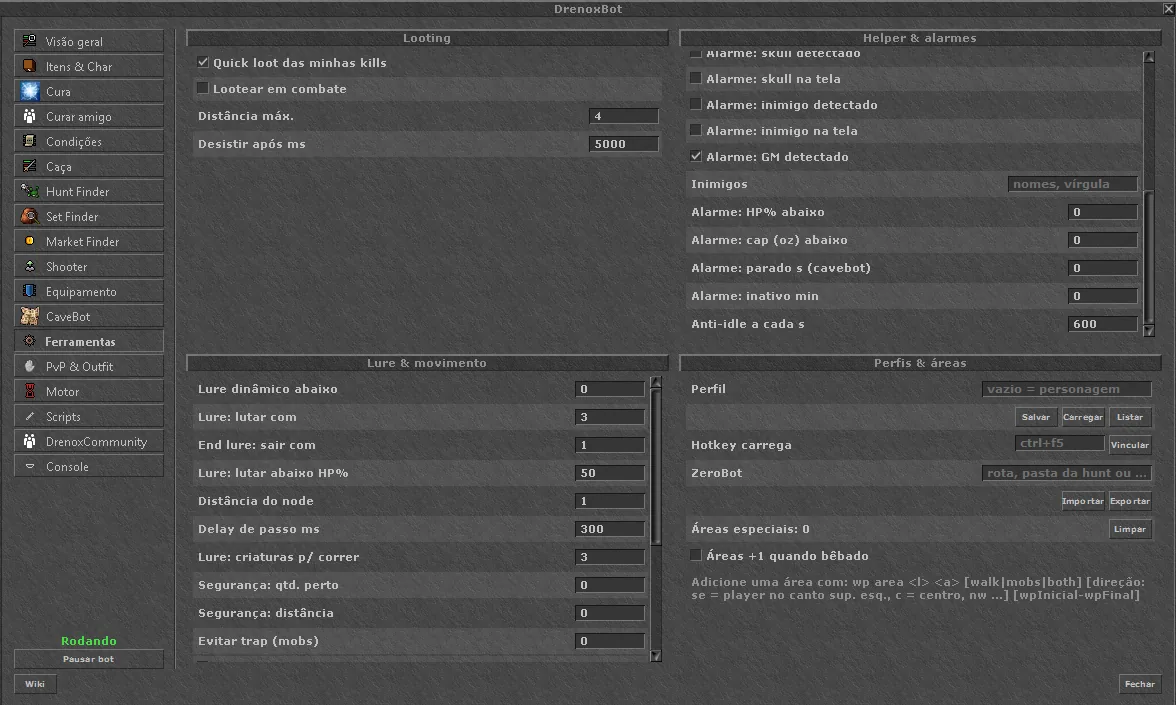
Tools tab with looting, alarms and lure
Tools tab
  • Looting: quick loot of your kills, loot during combat and max distance
  • 13 alarms: disconnect, PM, damage, player attack, player, monster, skull or enemy on screen, and GM
  • Warnings: HP below the limit, cap below the limit, idle for N seconds, and anti-idle
  • Lure: dynamic lure, when to fight and when to move on, distance between nodes and anti-trap
  • Profiles: save, load and switch profiles by hotkey
  • ZeroBot routes: import and export
PvP & Outfit

Target, anti-push and looks.

Options for PvP and an outfit changer only you can see.

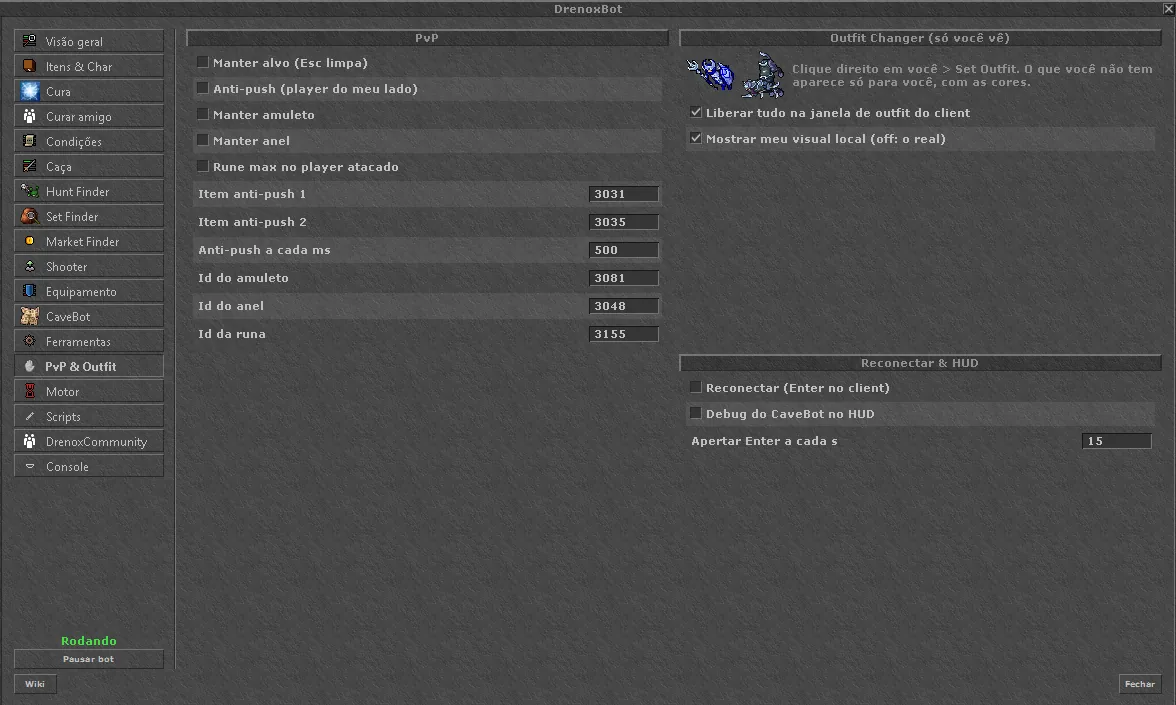
PvP and Outfit tab
PvP & Outfit tab
  • Hold target (Esc releases) and rune on the attacked player
  • Anti-push with 2 items and an interval
  • Amulet and ring always equipped
  • Local outfit and mount, with colors. Unlocks all of them in the client's outfit window
  • Reconnect automatically every N seconds
Engine

The bot's pace.

The time between actions and the tools the bot uses along the way.

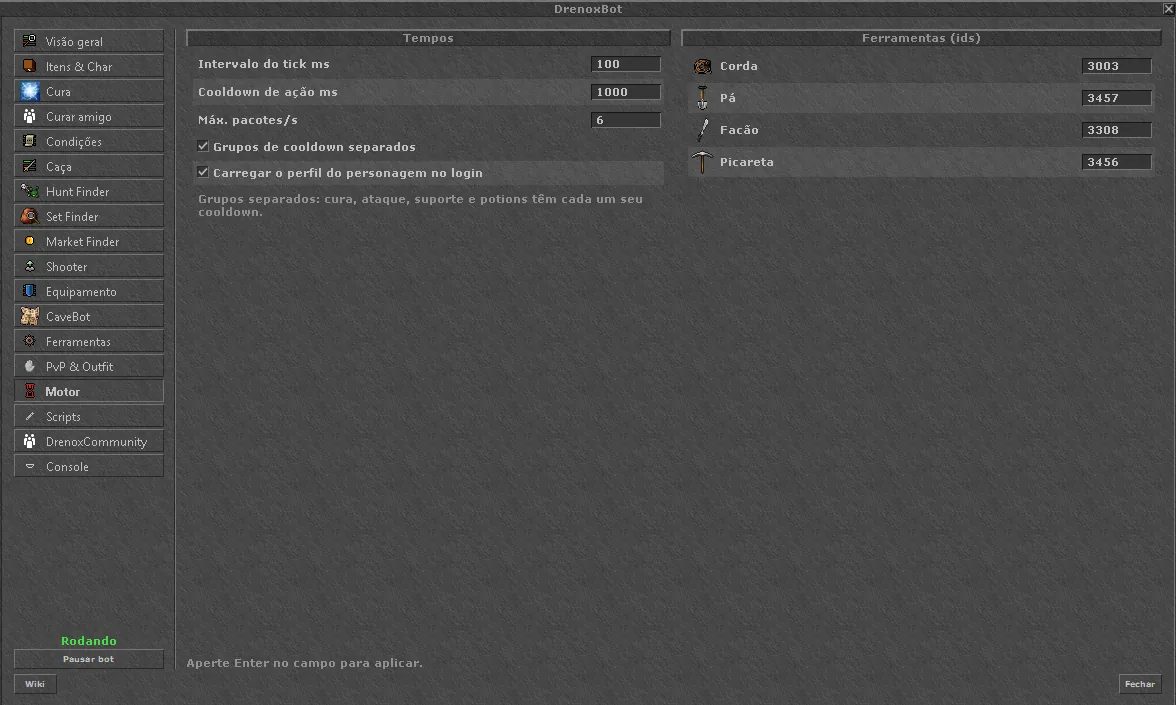
Engine tab
Engine tab
  • Intervals: tick, cooldown between actions and max packets per second
  • Separate cooldown groups: healing, attack, support and potions
  • Tools: rope, shovel, machete and pick, with the item icon
  • Profile per character, loaded at login
Scripting

Lua, with DrenoxBot's API.

Write, import and turn on scripts in the editor inside the client. Coming from another bot? ZeroBot-format scripts run too.

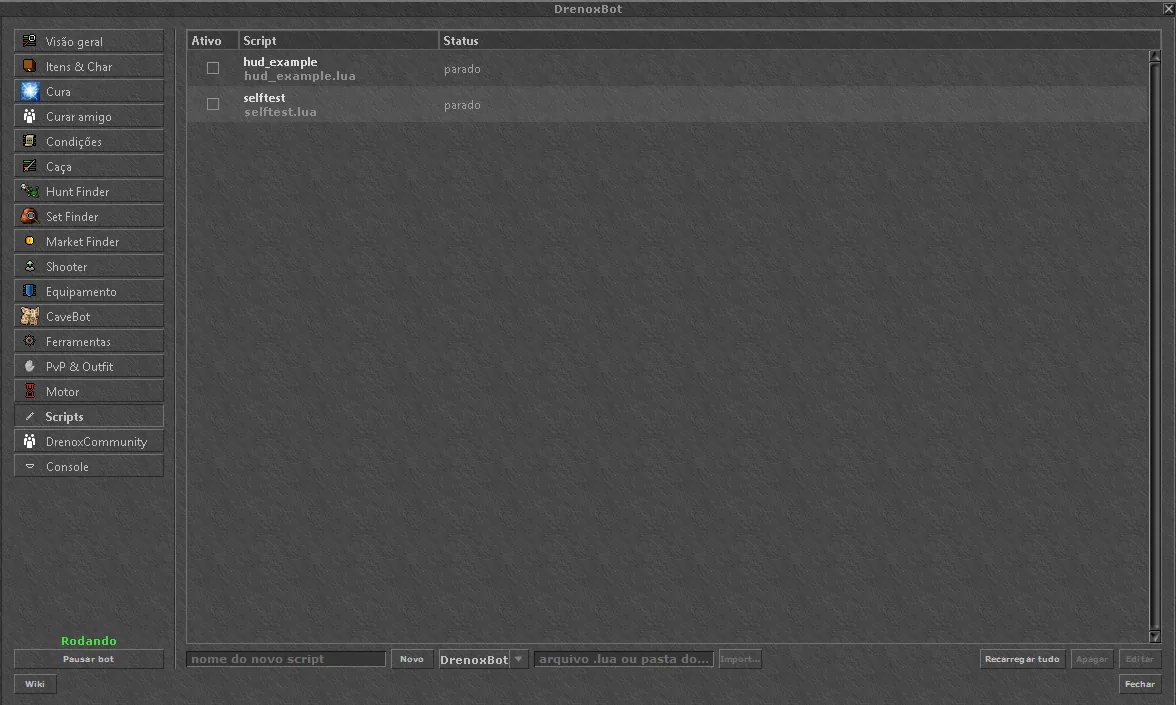
Scripting tab with the script list
Scripting tab
  • Editor inside the client, with Save and Save & activate
  • Import a file or a folder, from DrenoxBot or ZeroBot
  • API: Game, HUD, Creature, Player, Map, CaveBot, Container, Inventory, Spells, Npc, Timer, JSON, Sound and more
  • Events: the 23 classic ones, plus our own, such as creature health
  • Not yet available: store, forge and imbuement functions
DrenoxCommunity

The forum, inside the game.

It is the same forum as the site: topics, replies, profiles and the community of the OT you are playing on.

  • Your OT's community: each server the launcher detects gets its own
  • Profiles with a photo, the OTs the player plays and their posts
  • Downloads: scripts, cavebots and presets, with Install and Install + run
  • Share: your script, your route or parts of your config, with one click

Console

The log and the commands.

Everything the bot does shows up here, with errors highlighted.

Console tab with the log
Console tab
  • Commands: status, stats, target, wp list, lua and help
  • Filter lines by text
Scripting

When the tabs are not enough, write it.

Lua scripts with DrenoxBot's API: events, timers, windows and a HUD on the game screen. Already have scripts from another bot? ZeroBot-format ones run without changes.

scripts/target_hp.luaLua
-- Target HP in an on-screen HUD
local hud = HUD.new(20, 60, "Target: -")
hud:setColor(35, 213, 255)

Game.registerEvent(Game.Events.CREATURE_HEALTH, function(id, hp)
  local target = Creature.new(id)
  if target:isOnScreen() then
    hud:setText(target:getName() .. "  " .. hp .. "%")
  end
end)
Community

A forum for each server.

Each OT the launcher detects gets its own community. Talk about the server, the bot and the hunts, see other players' profiles and OTs, and download scripts, cavebots and presets. On the site or in the DrenoxCommunity tab, inside the game.

  1. Loading communities…
Open the forum
Plans

Two plans. What changes is the client.

The bot is the same in both: every tab, updates during the period, the official scripts and support on the forum. Pro runs on OTs; Pro Max, coming in 2027, is for RubinOT, DeusOT, DeusOLD and CipSoft's Tibia Global, with more robust anti-detection.

Pro

For players on OTs, with the CipSoft client or OTClient.

11.69/month

R$ 140.25 per year

Get Pro
Coming in 2027

Pro Max

For RubinOT, DeusOT, DeusOLD and CipSoft's Tibia Global.

93.42/month

planned, R$ 1,120.98 per year

  • RubinOT (RTC — RubinotClient)
  • DeusOT and DeusOLD
  • Tibia Global, CipSoft's official servers
  • Robust anti-detection system active
  • Every tab, Hunt Finder, Set Finder, Market Finder and Wiki
  • Lua scripts, forum and support
  • License for 1 PC
Coming soon · 2027
Getting started

From payment to your first hunt.

  1. 1

    Subscribe

    Pick a plan and pay with PIX, card or boleto. The license is released right away.

  2. 2

    Log in to the launcher

    Use your login. The setup detects the client version.

  3. 3

    Open Tibia

    The DrenoxBot window opens inside the client. Load a hunt from the library or from the Hunt Finder.

FAQ

Frequently asked questions.

Did not find yours? Ask on the forum.

Looking for a specific bot? See the complete Tibia Bot, the RubinOT bot, the Tibia OTServer bot and the Tibia Bot 2026 guide.

What is DrenoxBot?

DrenoxBot (Drenox Bot) is a Tibia Bot with its interface inside the client: healing, targeting, cavebot, wiki, Hunt Finder, Market Finder and Lua scripts. It runs on OTServers with the CipSoft client 15.23+, on OTs with OTClient, such as PaulistinhaOT, and with the Pro Max plan, coming in 2027, also on RubinOT, DeusOT, DeusOLD and CipSoft's Official Tibia.

Are there still bots in Tibia?

Yes. Tibia bots are still active in 2026, mainly on OTServers. DrenoxBot runs today on OTs with the CipSoft client 15.23 and 15.30, with healing, targeting, CaveBot and Lua scripts inside the client.

Is there a free Tibia bot?

DrenoxBot gives every new account 1 free hour of Pro, no card needed: all tabs unlocked, including CaveBot and scripts. After that, the Pro plan is paid. The scripts, cavebots and presets from the community are free. See the free Tibia bot.

Will there be a Tibia Global bot in 2026?

DrenoxBot for CipSoft's Tibia Global arrives with the Pro Max plan in 2027, for RubinOT, DeusOT, DeusOLD and Tibia Global, with the robust anti-detection system. In 2026 it runs on OTs with the CipSoft client or with OTClient, on the Pro plan. See the Tibia Global Bot and the Tibia Bot 2026 guide.

Does it work on RubinOT?

Not yet. RubinOT uses its own client (RTC, RubinotClient) and comes with the Pro Max plan, arriving in 2027. Today DrenoxBot runs on OTs with the CipSoft client 15.23 or newer and on OTs with OTClient. See the bot for RubinOT. If something does not work on your server, ask with the Request support button in the launcher.

Which Tibia version does it work on?

With the CipSoft client, the goal is to work on any version from 15.23 on, and the setup detects the version by itself. OTs with OTClient (OTC) also run on Pro: the first is PaulistinhaOT. OTs with anti-cheat on the list, such as TyronOT (EAC), run on Pro with the Anti-Cheat add-on. If you play on an older version, or a specific OT gives you trouble, ask with the Request support button in the launcher: the request becomes a forum topic under Version and OT requests, and you follow the answer there.

Is there a free trial?

Yes. Every new account gets 1 free hour of Pro: create your account with your Gmail, download the launcher from your profile and sign in with the same username and password. It works once per PC and per email.

What is the difference between Pro and Pro Max?

The clients and where it runs. Pro runs on OTs, with the CipSoft client or with OTClient (OTC), and on OTs with anti-cheat on the list (such as TyronOT) using the Anti-Cheat add-on. Pro Max is not on sale yet: it arrives in 2027, for RubinOT, DeusOT, DeusOLD and CipSoft's Tibia Global, with a much more robust anti-detection system. More details on the security page.

Does it work on the official Tibia servers?

It will work with the Pro Max plan, coming in 2027, for RubinOT, DeusOT, DeusOLD and CipSoft's Tibia Global. The anti-detection system uses a proprietary architecture designed to be invisible to anti-cheats, including BattlEye. Read the security page for good practices to avoid being reported.

Can I use it on more than one PC?

The license is for 1 PC. If you change computers, ask on the forum to release the new one.

Do my ZeroBot scripts work?

Yes. DrenoxBot has its own API, and it also runs ZeroBot-format Lua scripts without changes. .cb hunts go in through the CaveBot library.

What is the Coin API?

A Tibia Coin bank for your account. The bot records the coins flowing through your account and uploads them to a private ledger that you read through a simple HTTP API: see who sent, who received and your current balance, and build scripts on top of it. It is observation only: the bot never sends coins, it just records the transfers you make yourself. A R$ 16.50/month add-on on top of an active Pro or Pro Max plan, strictly per account. See the documentation.

What is the Community?

The DrenoxBot forum, on the site and inside the bot through the DrenoxCommunity tab. Each OT the launcher detects gets its own community, where the players of that server talk about the game, the bot and anything else they want. It has profiles with a photo and each player's OTs, topics, replies, and a downloads area with scripts, cavebots and presets.

How do I get support?

On the forum. That is where support, update notices and news live. Problem with a version or an OT? Use Request support in the launcher.

Your next hunt starts here.

See plans