
Documentation › Forum
Formatting posts
Topics, replies and these documentation pages all use the same format: Markdown plus a few blocks of our own, such as tip boxes, steps, tabs and columns. This page shows everything you can use. Each example shows first what you type and then how it looks in the post.
The editor#
Toolbar#
| Button | What it inserts |
|---|---|
| B | Bold: **text** (Ctrl+B) |
| I | Italic: *text* (Ctrl+I) |
| S | Strikethrough: ~~text~~ |
| backtick | Inline code: `text` |
| ↗ | Link: [text](https://) (Ctrl+K) |
| H | Heading: ## Heading |
| • / 1. | List / numbered list |
| ☐ | Task list: - [ ] Task |
| ❝ | Quote: > Quote |
| { } | Lua code block |
| ▦ | Two-column table |
| Image | Picks images from your PC to upload |
| Blocks ▾ | Tip, Note, Warning, Danger, Steps, Tabs, Collapsible, Columns, Gallery, Divider, Key, HP and Mana |
With text selected, the buttons wrap the selection: select a word and press Ctrl+B to make it bold. With a URL selected, Ctrl+K builds the link and selects "text" for you to replace. Blocks always go on their own line, separated from the rest by a blank line.
The "/" menu#
Type / at the start of a line (or after a space) to open the block menu. Keep typing to filter it, for example /tip or /tab. Use ↑ and ↓ to choose, Enter or Tab to insert and Esc to close.
Write, Preview and Side by side#
The buttons in the corner of the editor switch the mode:
- Write: only the text.
- Preview: only the finished post, the way it will look.
- Side by side: the text and the finished post together, updating as you type.
The footer has the Formatting guide link (this page) and the character counter, which changes colour above 90% of the limit.
Images#
You can add images in three ways:
- click Image in the toolbar (you can pick several at once);
- paste with Ctrl+V (a screenshot, for example);
- drag the file into the editor.
Accepted formats: PNG, JPEG, WebP and GIF. While uploading, ![uploading name…]() shows in the text. When it finishes, it becomes : replace the text in brackets with the caption you want.
Drafts#
The editor saves what you are writing in the browser, by itself, as you type. If the page closes or you leave without sending, the text comes back next time, with the notice "Draft restored.". After the post is sent, the draft is deleted. The draft stays only in this browser, on this PC.
Text#
**bold** or __bold__
*italic* or _italic_
~~strikethrough~~
`inline code`
**bold with *italic* inside**
bold or bold
italic or italic
strikethrough
inline code
bold with italic inside
A line break in the text becomes a line break in the post. Leave a blank line to start another paragraph.
Links#
[Installation page](/comunidade/docs/instalar)
[Tibia website](https://www.tibia.com)
Direct link: https://www.tibia.com
Installation page Tibia website Direct link: https://www.tibia.com
Links accept http:// and https:// addresses, paths on this site (starting with /) and anchors (#section). Links to other sites open in a new tab. An address that is none of these shows as text, with the address in parentheses.
Headings#
## Heading
### Subheading
#### Smaller heading
Smaller heading#
Use ##, ### and ####. A single # becomes ##, because the big title of the page is the topic's. The example above shows only the finished ####, so this page's table of contents stays clean.
Lists#
- Mana potion
- Great mana potion
  - Sold in the Magic Shop
- Ultimate mana potion

1. Go to the depot
2. Take out the potions
3. Go back to the hunt- Mana potion
Great mana potion
- Sold in the Magic Shop
- Ultimate mana potion
- Go to the depot
- Take out the potions
- Go back to the hunt
Bulleted lists use -, * or +. Numbered lists use 1. or 1), and the list starts at the first number you write. For a list inside another, indent the line with two spaces.
Task list#
- [x] Buy supplies
- [x] Set up healing
- [ ] Record the route- Buy supplies
- Set up healing
- Record the route
- [ ] is an open task, - [x] a done task.
Quote#
> The bot stopped on the floor below.
> Does anyone know why?
The bot stopped on the floor below. Does anyone know why?
Each line of the quote starts with >. The other formatting works inside it, such as lists and bold.
Code blocks#
```lua
-- shows your health in the Console
print(Player.getHealth())
```-- shows your health in the Console
print(Player.getHealth())Open and close the block with three backticks (or three ~). Write lua or json right after the opening backticks to colour the code. Any other language, or none, stays uncoloured. The block shows the language name and has a Copy button. Nothing inside a code block is formatted: it is the way to show text exactly as it is.
Tables#
| Potion | Heals | Price |
|:---|:---:|---:|
| Mana potion | 75-125 | 56 gp |
| Great mana potion | 150-250 | 144 gp || Potion | Heals | Price |
|---|---|---|
| Mana potion | 75-125 | 56 gp |
| Great mana potion | 150-250 | 144 gp |
The first line is the header and the second separates the header from the rows. The : in the separator line aligns the column: :--- left, :---: centre and ---: right. To write a | inside a cell, use \| or put it inside code.
Images#
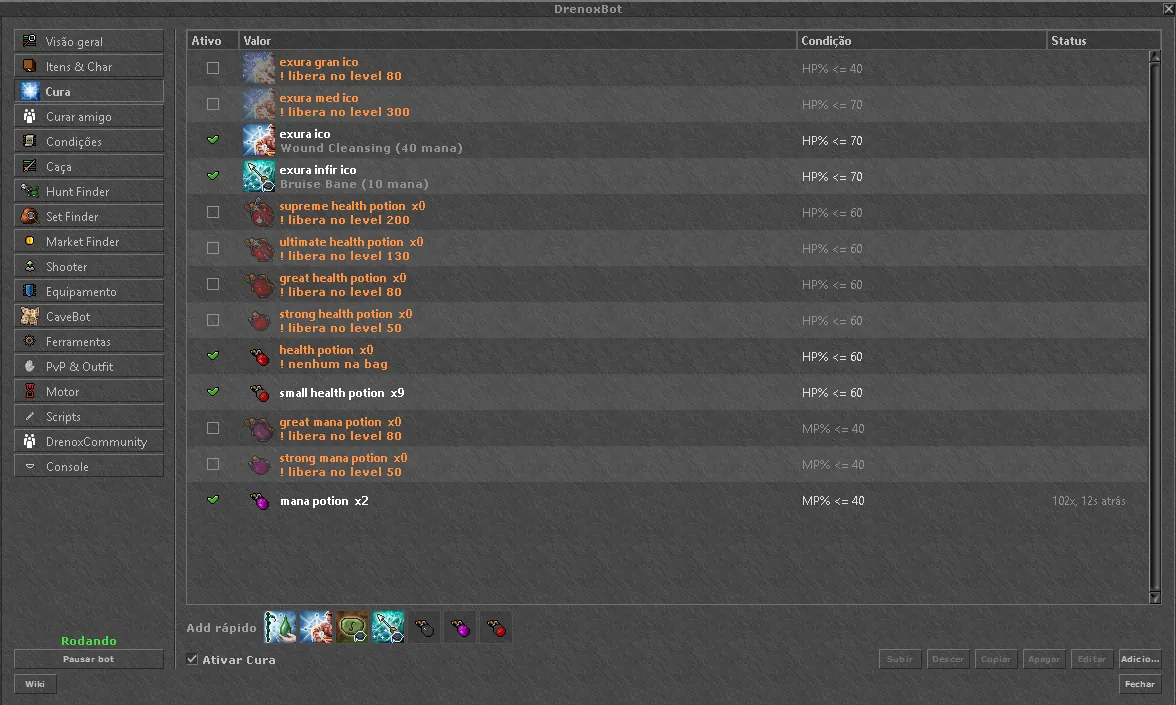An image alone on a line becomes a figure, with the text in brackets as its caption. Click the image to zoom. An image in the middle of a paragraph shows small, inline with the text.
Divider#
Before the divider.

---

After the divider.
Before the divider.
After the divider.
A line with only --- (or ***, or ___) draws the line. Leave a blank line before it.
Callout boxes#
:::tip
Turn on Healing before CaveBot.
:::

:::info
The bot keeps market prices for 30 minutes.
:::

:::warning[You must be at the depot]
Stand next to a locker.
:::

:::danger
Market automation moves your real gold.
:::Open with ::: and the name, close with ::: on a line of its own. The title in brackets is optional; without it, the box uses Tip, Note, Warning or Danger. Any other formatting works inside the box.
Steps#
:::steps
1. Open the Healing tab
   It is in the bot's sidebar.
2. Click Quick add
   The bot creates rules with your spells and potions.
3. Turn the module on
:::It is in the bot's sidebar.
The bot creates rules with your spells and potions.
Inside :::steps goes a numbered list. The first line of each item is the step title; the indented lines under it are the details.
Tabs#
:::tabs
::tab[Knight]
Use exura med ico and great health potion.
::tab[Druid]
Use exura vita and ultimate mana potion.
:::Use exura med ico and great health potion.
Use exura vita and ultimate mana potion.
Each ::tab[Name] starts a new tab. Click the name to switch; with a tab focused, the ← and → arrows switch too.
Collapsible#
:::details[See the full config]
The content only shows when someone clicks the title.
:::
See the full config
The content only shows when someone clicks the title.
Good for long configs, logs and quest spoilers. Without a title, it shows "Details".
Columns#
:::columns
::column
**Before:** 1.2kk xp/h
::column
**After:** 1.8kk xp/h
:::
Before: 1.2kk xp/h
After: 1.8kk xp/h
Each ::column starts a column. On small screens, such as a phone, the columns can stack one under the other.
Gallery#
:::gallery



:::One image per line. The gallery builds a grid, and each image zooms with a click. With the Gallery button in the Blocks menu, you can paste or drag the images straight into it.
A block inside another#
To put a block inside another, use more : on the outer block. Here the tabs use four and the inner tip uses three:
::::tabs
::tab[Healing]
:::tip
Cooldown 0 uses the spell's real cooldown.
:::
::tab[Hunting]
Priority from 1 to 9.
::::Priority from 1 to 9.
The outer block closes with the same number of : it opened with.
Keys, HP and mana#
Press :kbd[Ctrl+B] for bold.
Heal with :hp[exura vita] below 50%.
Use :mana[great mana potion] below 30% mana.
Press Ctrl+B for bold. Heal with exura vita below 50%. Use great mana potion below 30% mana.
:kbd[...] (or :tecla[...]) draws a key. :hp[...] colours the text with the health colour and :mana[...] (or :mp[...]) with the mana colour.
Mentions#
Thanks for the route, @name!Write @ followed by a member's name (3 to 24 letters, digits, _, . or -). In the post, the name becomes a link to their profile, and they get a notification (up to 10 members per post). Inside code, a mention does not become a link.
Escaping a character#
\*this is not italic\*
\:kbd[this is not a key either]
*this is not italic* :kbd[this is not a key either]
A \ before a symbol (*, _, `, [, #, |, :, @, ~ and others) shows the symbol as text, without formatting.
Portuguese and English names#
Every block accepts its Portuguese or English name, in any post:
| Portuguese | English |
|---|---|
:::dica | :::tip |
:::info or :::nota | :::note |
:::aviso or :::atencao | :::warning |
:::perigo or :::cuidado | :::danger |
:::passos | :::steps |
:::abas and ::aba[...] | :::tabs and ::tab[...] |
:::detalhes[...] | :::details[...] or :::spoiler[...] |
:::colunas and ::coluna | :::columns and ::column |
:::galeria | :::gallery |
:tecla[...] | :kbd[...] |
A block with an unknown name does not disappear: its content shows in a plain box.
Comments
to comment.